How to Search Trademark Online in India: Step-by-Step Guide (2026)
Updated 12 Nov, 2026

Before you name your business, launch a product or file a trademark application, check whether the name is already taken. A few minutes on the official search portal can save you from objections, legal notices and the cost of rebranding later.
This guide shows you exactly how to search trademark online on the IP India public search portal, with screenshots of each step, how to read the results, and the mistakes that most often lead to a refused application.
Prefer to have an expert do it? Our trademark search service covers identical, similar and phonetic marks in your class and tells you clearly whether your name is safe to file, for ₹199.
Free Trademark Search
Check whether your brand name is already filed with the Trade Marks Registry, class by class. Free and instant.
What Does It Mean to Search Trademark Online?
A trademark search means checking the official database of the Trade Marks Registry, maintained by the Controller General of Patents, Designs & Trade Marks (CGPDTM), for marks that are the same as or similar to the one you want to use.
The database holds every application filed in India, whether registered, pending, objected, opposed, abandoned or removed. For each mark it shows the application number, class, filing date, proprietor, status and the goods or services covered.
A Google search or a domain check is not a trademark search. Google misses pending applications, registered marks that are not yet in use, and businesses that sell offline. Only the Registry's database shows the legal rights other owners hold.
Why Search Before You File
Avoid objections: the Registry examines every application against Section 11 of the Trade Marks Act (identical or deceptively similar earlier marks) and Section 9 (descriptive or generic names). A search lets you spot Section 11 conflicts before you file. See our guide to the grounds of refusal.
Save non-refundable fees: the government fee is ₹4,500 per class for individuals, startups and small enterprises, and ₹9,000 for other applicants. It is not refunded if your application is refused.
Protect your investment: finding a conflict after you have paid for a logo, packaging, website and marketing means starting again.
Know your market: the results show who else uses similar names in your class, so you can choose something more distinctive from the start.
The Three Types of Trademark Search
The IP India portal offers three search types. For a thorough check, use all that apply to your mark.
Wordmark search (by text)
Checks for marks containing your words. You choose how strictly to match:
- Start With: marks beginning with your text. Searching "Metro" finds Metropolis and MetroMall.
- Contains: marks with your text anywhere in them. Searching "Fresh" finds FreshMart and DairyFresh. This is the widest and most useful option.
- Match With: exact matches only. Too narrow on its own, because deceptively similar marks also cause objections.
Phonetic search (by sound)
Finds marks that sound like yours even when spelled differently, such as "Kwik" and "Quick", or "Fone" and "Phone". Sound-alike marks are a common ground for objection under Section 11, and this matters even more in India, where names are often transliterated from regional languages.
Vienna code search (logos)
Logos cannot be searched by uploading an image. Instead, each visual element, such as a lion, a star or a tree, has a code under the Vienna Classification, and you search by that code in your class. If your mark combines a name and a logo, run both a wordmark search and a Vienna code search. Read more on the difference between word marks and device marks.
| Wordmark search | Phonetic search | |
|---|---|---|
| Finds | Identical or visually similar marks | Marks that sound alike |
| Best for | Spelling and prefix checks | Pronunciation conflicts |
| Example | Certis vs Certiss | Fone vs Phone |
How to Search Trademark Online: Step by Step
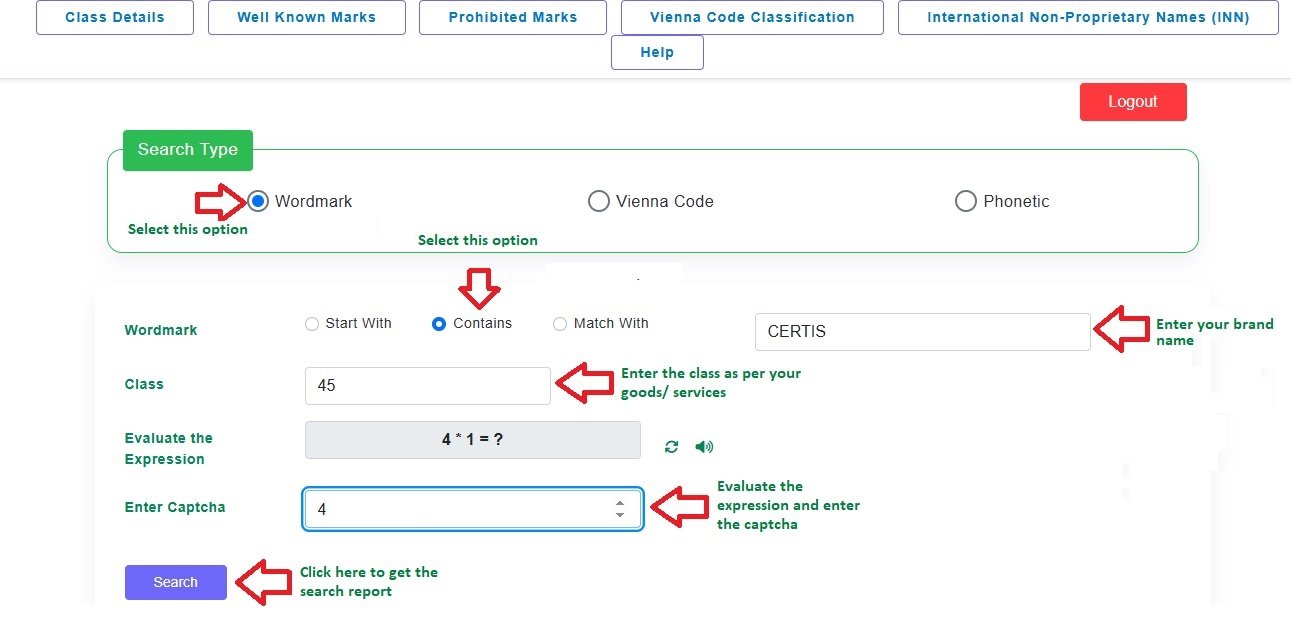
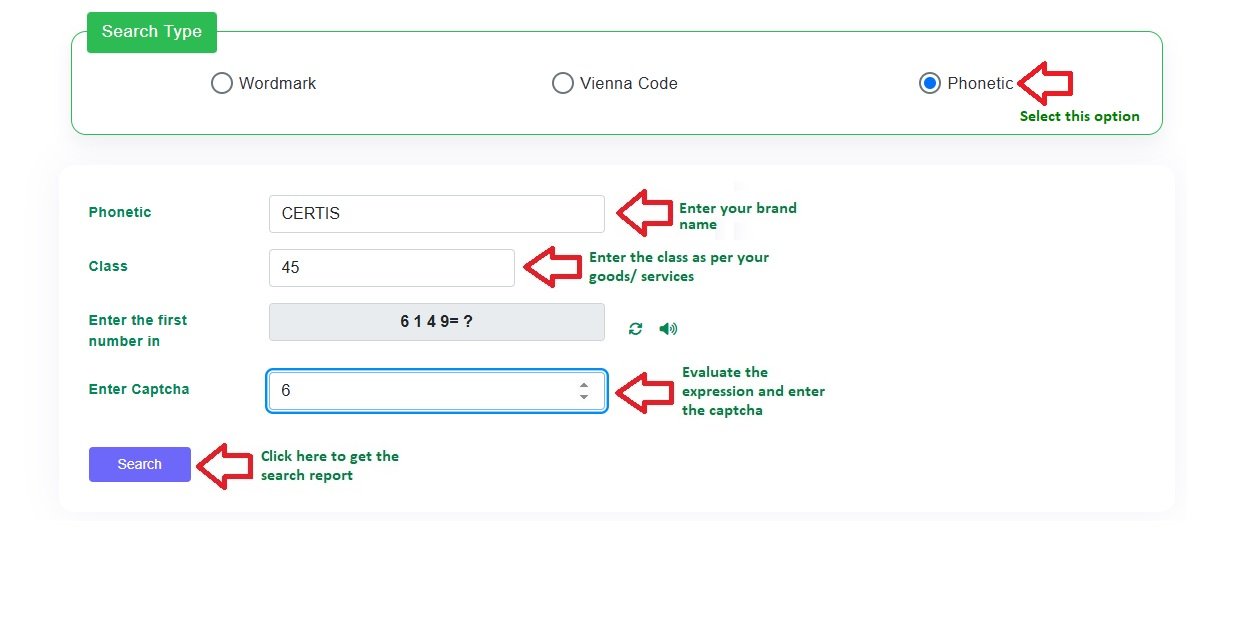
Here is the process on the official portal, with screenshots. We use the brand name "Certis" in class 45 as an example.
Step 1: Log in with OTP
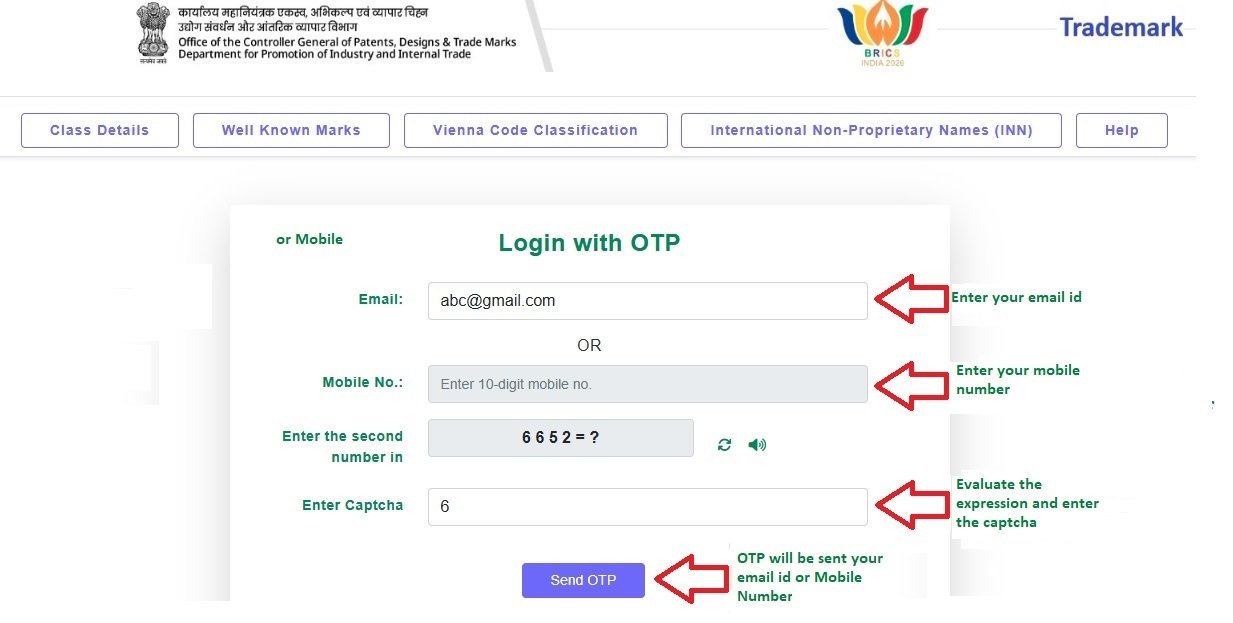
Open the IP India trademark public search portal. Enter your email address or mobile number, solve the simple maths captcha and click Send OTP. Enter the OTP you receive to continue. The search itself is free.
Step 2: Run a wordmark search
Under Search Type, choose Wordmark. Select Contains, type your brand name, enter your class number and the captcha, then click Search. The portal searches one class at a time, so repeat for each class your business covers. Not sure of your class? See our classification of goods and services.
Step 3: Scan the results
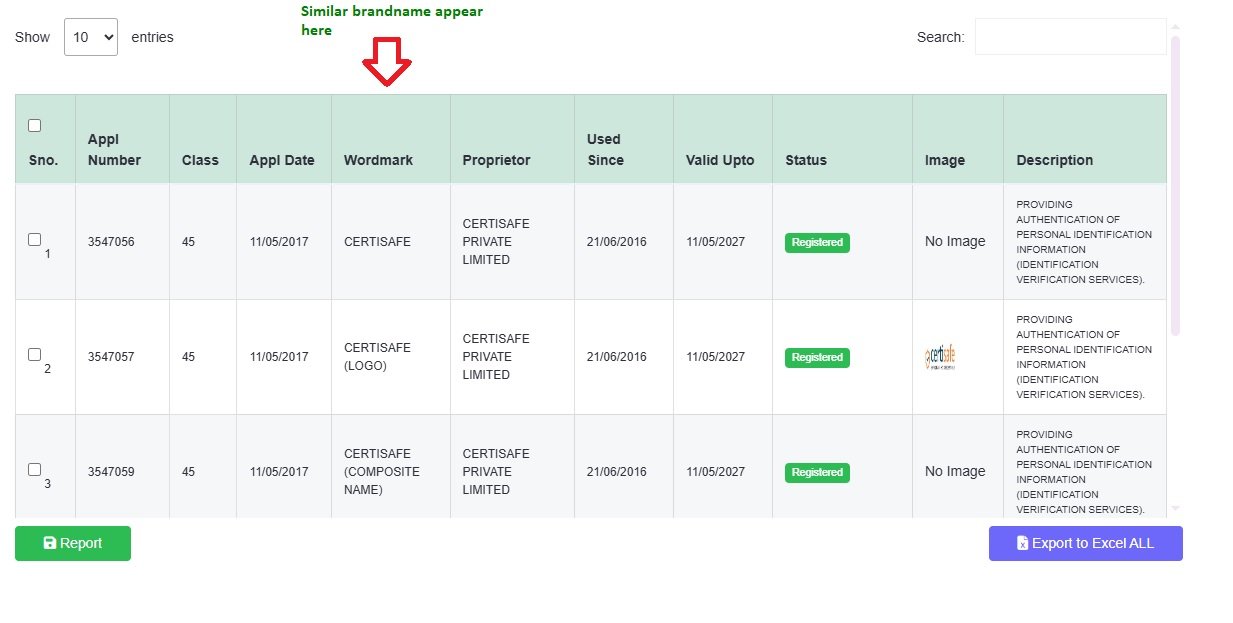
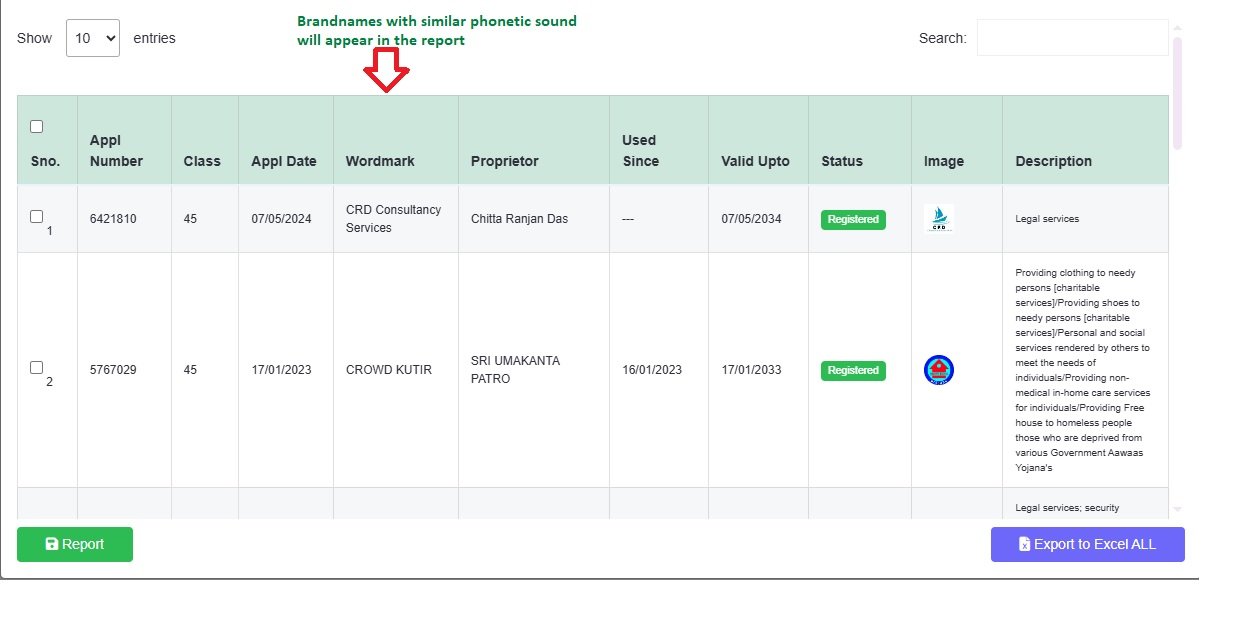
The results table lists every matching application with its number, class, filing date, wordmark, proprietor, "used since" date, validity, status and description of goods or services.
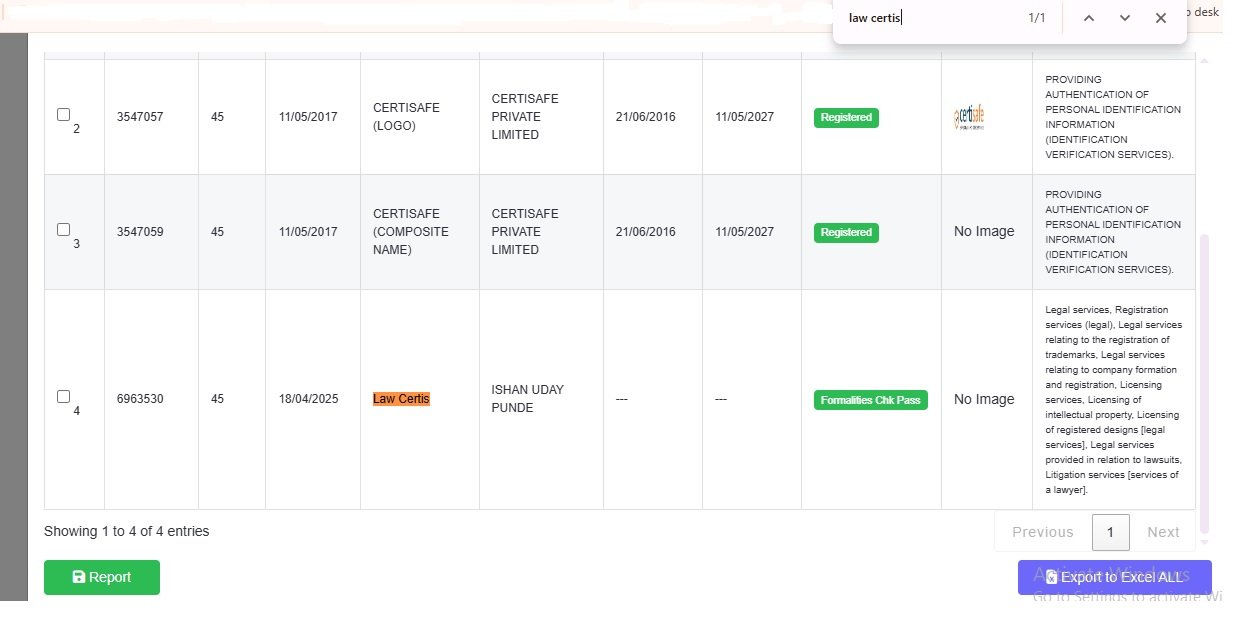
Tip: long result lists are hard to read. Press Ctrl+F (Cmd+F on a Mac) and type your brand name one letter at a time to jump to the closest matches.
Step 4: Run a phonetic search
Go back, choose Phonetic, enter the same brand name and class, and search again. This finds marks that sound like yours even with a different spelling.
Step 5: Search your logo by Vienna code
If your mark includes a logo, choose Vienna Code, enter the codes for its visual elements (the portal's Vienna Code Classification link lists them) and your class, and search.
Step 6: Decide, and search again before filing
Weigh each similar result using the guide below. The database is updated as new applications are filed, so if some time passes before you apply, run the search again just before filing.
How to Read Trademark Search Results
The Status column tells you how much each result matters:
Registered: the mark is in force and its owner has exclusive rights for the listed goods or services. An identical or deceptively similar name in the same or a related class will almost certainly be objected to or opposed.
Pending, Formalities Check Pass, Objected: filed but not yet registered. Treat these like registered marks: an earlier application has priority over yours.
Opposed: a third party has challenged the mark after it was advertised. It may still proceed to registration. See the trademark opposition process.
Abandoned or Removed: the application lapsed or was withdrawn. That does not always make the name free: some marks can be restored, and the owner may still be using the name.
Common Mistakes When Searching Trademark Online
Only searching for exact matches: misses similar-looking and sound-alike marks that can still block you.
Searching only one class: each class your business covers needs its own search.
Ignoring related classes: a mark in a closely related class, such as clothing (25) and clothing retail (35), can still conflict.
Ignoring abandoned marks: they can sometimes be restored.
Forgetting Section 9: a name with no conflicts can still be refused if it simply describes the product.
Treating a clean result as a guarantee: only the Registrar can grant registration.
When to Get a Professional Trademark Search
The portal gives you data, not a decision. A professional search adds the judgement: whether a similar mark is close enough to cause an objection, whether a related class matters, and how to adjust your name if it is at risk.
Our trademark search report costs ₹199, is usually ready within 30 minutes, includes identifying the right class, and is adjusted against the filing fee if you go ahead. If the name is clear, we can file your trademark registration within 24 hours of receiving your documents, from ₹6,400 all inclusive.
Already filed? Check your trademark status.
Frequently Asked Questions
Is there a free way to search trademark online in India?
Yes. The official IP India public search portal (tmrsearch.ipindia.gov.in) is free to use. You log in with a one-time password sent to your email or mobile number, then run wordmark, phonetic or Vienna code searches. The portal gives you raw results; judging whether a similar mark is a real conflict is where a professional search report helps.
Is a trademark search mandatory before filing?
No, the law does not require it. But filing without one is risky: government fees are not refunded if your application is refused because a similar mark already exists.
Can I search a trademark by logo or image?
Not by uploading an image. Logos are searched using Vienna codes: each visual element (a lion, a star, a tree, a shape) has a code under the Vienna Classification, and you search by that code and your class.
What if no exact match is found?
Your application can still be objected to if a deceptively similar mark exists, whether it looks or sounds alike, or if the Registrar finds the name descriptive or generic under Section 9. A clean exact-match search is a good start, not a guarantee.
Can I search more than one class at a time?
The portal searches one class per query, so run a separate search for each class your business covers. You can file a trademark in multiple classes if your brand covers different goods or services.
How long does a professional trademark search take?
The portal returns results instantly. Our expert search report, which interprets the results and covers similar and phonetic marks, is usually ready within 15 to 30 minutes once we have your brand name and business activity, provided the government portal is working normally.
What should I do if my search finds a similar mark?
Do not abandon the name without advice. Depending on the conflict, the options include modifying the name, checking whether the earlier mark is actually in a related class or still in force, or filing with evidence of your earlier use. A professional can tell you which applies.
Does a clean search give me the right to use the name?
No. A search only shows whether conflicting marks exist. Rights come from filing and registering your trademark under the Trade Marks Act, 1999. File promptly after a clean search, because an application filed before yours takes priority.
Contact Law Certis Consulting
We have worked on trademarks since 2013 and handle searches and filings online for clients across India.
Phone: +91 80870 23377
Email: consulting@law-certis.in
Address: 1202/28, 2nd Floor, Bhagyoday Bungalow, Apte Road, Shivajinagar, Pune, Maharashtra 411004